
How to Set Up Facebook Conversions API (CAPI) in 2026
Step-by-step guide to setting up Meta Conversions API. Improve match rates, recover lost signals, and optimize your Facebook ad campaigns.
ONClix Team
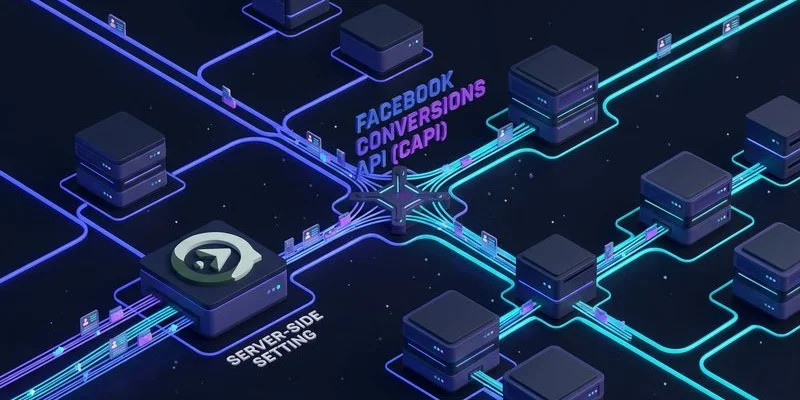
The Meta (Facebook) Pixel has been the backbone of Facebook Ads tracking for over a decade, but it is no longer enough on its own. Browser privacy updates, ad blockers, and iOS restrictions have eroded the pixel’s ability to capture conversion events reliably. Meta’s Conversions API (CAPI) is the server-side complement that recovers those lost signals, and in 2026 it is no longer optional. It is a necessity for any advertiser who wants their Facebook campaigns to optimize effectively.
This guide walks you through the complete setup process, from understanding why CAPI matters to configuring event deduplication and optimizing your match rates.
Why the Facebook Pixel Alone Is Not Enough
We have analyzed hundreds of ad accounts this year, and the pattern is consistent. Relying solely on browser-based tracking silently drains advertising budgets. The Facebook Pixel works by loading a JavaScript snippet on your website that fires events when users take actions like viewing a page, adding to cart, or completing a purchase.
This client-side approach has severe vulnerabilities in the current US privacy landscape.
- Ad Blockers: Recent 2025 data indicates that roughly 37% of US internet users now employ ad blockers. These tools prevent the Facebook Pixel from loading entirely, rendering those conversions invisible to your dashboard.
- ITP and Browser Restrictions: Safari’s Intelligent Tracking Prevention (ITP) caps the pixel’s cookie lifespan to just 7 days. If a user clicks your ad but waits 8 days to buy, the pixel cannot attribute that sale to your campaign.
- iOS App Tracking Transparency (ATT): Since the initial rollout of iOS 14.5, opt-in rates for tracking in the US have stabilized around 26%. You are flying blind on nearly three-quarters of your iOS traffic if you rely only on the pixel.
- Network Latency: Client-side tracking depends on the user’s browser successfully completing the request. Slow mobile connections often cause page abandonment before the pixel fires, creating significant data gaps.
The cumulative effect is that the pixel alone likely misses 15% to 30% of your actual conversions. These “ghost sales” mean Facebook’s algorithm lacks the data it needs to find your best customers. Proper marketing attribution software recovers these lost signals and feeds them back to your ad platforms automatically. Your cost per acquisition (CPA) rises falsely. Campaigns underperform simply because the system cannot see the wins it is actually generating.
What the Conversions API Does
CAPI sends conversion events directly from your server to Facebook’s servers, bypassing the browser entirely. When a user completes a purchase, your server sends that event to Facebook through a secure API call. Because this happens server-to-server, ad blockers, browser restrictions, and client-side failures have no impact.
Comparison: Pixel vs. Conversions API
| Feature | Facebook Pixel (Client-Side) | Conversions API (Server-Side) |
|---|---|---|
| Data Source | User’s Browser | Your Server |
| Ad Blocker Impact | High (Blocked) | None (Bypassed) |
| Cookie Lifespan | Limited (1-7 days on Safari) | Extended (Months via Server) |
| Setup Difficulty | Low (Copy-paste code) | Medium to High (Requires Dev) |
| Reliability | ~70-80% | ~99% |
The key benefits include:
- Ad Blocker Immunity: Server-side events are sent regardless of what the user’s browser does or blocks.
- Extended Attribution Windows: CAPI matches conversions to clicks that happened weeks or months ago when combined with CNAME tracking for first-party cookies.
- Higher Match Rates: You can send hashed personal identifiers (email, phone, name) alongside the event. Facebook uses these to match the conversion to the correct user, producing significantly higher match rates than the pixel alone.
- Data Reliability: Server-side transmission is far more stable than client-side JavaScript execution.
Step-by-Step Setup Guide
Step 1: Obtain Your Access Token and Pixel ID
We recommend creating a dedicated “System User” in your Business Manager to generate this token rather than using a personal account. This prevents the token from breaking if an employee leaves your organization.
Log into Meta Events Manager and select the pixel associated with your ad account. Navigate to Settings and find your Pixel ID. Then generate a Conversions API access token. This token authenticates your server when sending events to Facebook.
Store the access token securely in your server’s environment variables. Never expose it in client-side code or commit it to version control.
Step 2: Choose Your Implementation Method
There are several ways to send events through CAPI. Choosing the right one depends on your technical resources and budget.
1. Partner Integration (Easiest) Many platforms like Shopify, WooCommerce, and Segment have built-in CAPI integrations.
- Shopify Users: Go to preferences and select “Maximum” data sharing to enable CAPI automatically.
- Pros: No coding required, fast setup.
- Cons: Less customization control.
2. Conversions API Gateway (Moderate) Meta offers a Gateway that you can deploy on cloud services like AWS or Google Cloud. It acts as a bridge, automatically capturing pixel events and sending them via server.
- Cost: Expect to pay roughly $30 to $50 per month in AWS hosting fees for a standard setup.
- Pros: Automates deduplication, easier than custom coding.
3. Direct API Integration (Most Powerful) Send HTTP POST requests directly to the Facebook Graph API from your server. This gives you full control over the event payload and timing. It is the recommended approach for custom implementations.
For this guide, we will focus on the direct API integration. This method provides the clearest understanding of how CAPI works.
Step 3: Send Your First Event
CAPI events are sent as POST requests to the Facebook Graph API endpoint. Here is an example of sending a purchase event:
const payload = {
  data: [{
    event_name: "Purchase",
    event_time: Math.floor(Date.now() / 1000),
    action_source: "website",
    event_source_url: "https://yourdomain.com/thank-you",
    user_data: {
      em: hashSHA256(userEmail),
      ph: hashSHA256(userPhone),
      fn: hashSHA256(userFirstName),
      ln: hashSHA256(userLastName),
      client_ip_address: requestIP,
      client_user_agent: requestUserAgent,
      fbc: facebookClickID,  // from _fbc cookie
      fbp: facebookBrowserID // from _fbp cookie
    },
    custom_data: {
      currency: "USD",
      value: 99.99,
      content_ids: ["product-123"],
      content_type: "product"
    }
  }]
};
The user_data object is critical for match quality. The more identifiers you provide, the higher your match rate will be. At minimum, include the hashed email address, the client IP address, the user agent, and the fbc and fbp cookie values.
Insider Tip: Always normalize your data before hashing. Convert email addresses to lowercase and remove any whitespace before applying the SHA-256 hash. If you hash ” [email protected] ” instead of “[email protected]”, Facebook will not recognize the email, and your match rate will suffer.
Step 4: Set Up Event Deduplication
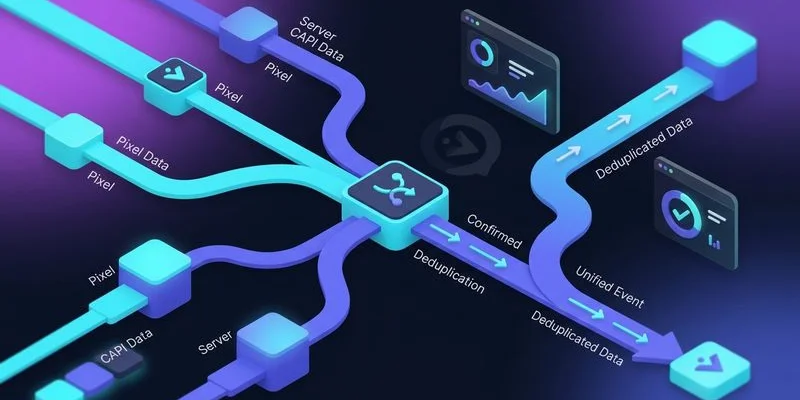
If you run both the pixel and CAPI (which you should), the same conversion event will be sent twice. One signal comes from the browser via the pixel, and one comes from your server via CAPI. Without deduplication, Facebook will count each conversion twice, inflating your numbers.
Deduplication works through the event_id parameter. Assign a unique ID to each event and include it in both the pixel event and the CAPI event. Facebook will recognize that both events represent the same action and only count it once.
// Generate a unique event ID
const eventId = `purchase_${orderId}_${Date.now()}`;

// Include in pixel event (client-side)
fbq('track', 'Purchase', { value: 99.99 }, { eventID: eventId });

// Include in CAPI event (server-side)
payload.data[0].event_id = eventId;
The event ID must be identical in both the pixel and CAPI calls for the same action. Using the order ID or transaction ID as the basis for the event ID is a reliable approach.
Step 5: Verify in Events Manager
After sending your first events, open Meta Events Manager and navigate to the Test Events tab. You can use the Test Events tool to send test events and verify they are received correctly.
Check for these specific indicators:
- Correct Parameters: Events should appear with the correct event name and value.
- Match Quality Score: Look for a score shown as a percentage or rating.
- Deduplication: Ensure the tool identifies the browser and server events as a merged pair.
- Custom Data: Verify all item IDs and currency codes are passing through.
Meta provides an Event Match Quality score from 1 to 10 for each event type. Aim for a score of 7 or higher. Scores below 6 indicate that your events are not sending enough user data for Facebook to reliably match conversions to ad clicks.
Optimizing Match Rates
Match rate is the percentage of your CAPI events that Facebook can match back to a Facebook user. Higher match rates mean better attribution and better campaign optimization.
Here is how to maximize yours:
1. Send as Many User Data Parameters as Possible
Email and phone number are the most powerful matchers. First name and last name improve match rates further. Always hash these values with SHA-256 before sending.
2. Capture and Forward the fbc Cookie
The _fbc cookie is set when a user clicks a Facebook ad. It contains the click ID that directly connects the conversion to the ad click. Capturing this cookie on your server and including it in the CAPI event dramatically improves match rates.
3. Capture the fbp Cookie
The _fbp cookie is Facebook’s browser ID. Including it helps Facebook match events even when no click ID is present.
4. Send the Client IP Address and User Agent
These parameters help Facebook’s matching algorithms identify users who did not provide personal information.
5. Use CNAME Tracking for Cookie Persistence
The _fbc and _fbp cookies are first-party cookies that can be extended through CNAME tracking. Longer cookie lifespan means the click ID and browser ID are available for longer periods. This improves match rates for conversions that happen days or weeks after the initial click.
Common Issues and Troubleshooting
Events Not Appearing in Events Manager Check that your access token is valid and not expired. Verify that the Pixel ID in your API endpoint URL is correct. Ensure your server can reach the Facebook Graph API (no firewall blocking outbound HTTPS).
Low Match Quality Score
Add more user data parameters. Email and phone number have the biggest impact. Also ensure you are forwarding the _fbc and _fbp cookies correctly.
Duplicate Events
Verify that the same event_id is being sent in both the pixel event and the CAPI event. Check that the event ID format is consistent between client and server.
Events Delayed CAPI events should be sent within minutes of the action occurring. Facebook’s matching algorithms perform best with real-time or near-real-time event data.
Conclusion
Facebook Conversions API is no longer an advanced optimization. It is a baseline requirement for effective Facebook advertising in 2026. The pixel alone misses too many conversions to provide Facebook’s algorithm with the signal it needs to optimize your campaigns.
We advise every business owner to view this not just as a technical task but as a revenue safeguard. Setting up CAPI takes a few hours of engineering work, but the improvement in data quality, match rates, and campaign performance makes it one of the highest-ROI tracking investments you can make. CAPI is a key component of a broader conversions API strategy that spans all your ad platforms. Start by auditing your current signal loss today and take the first step toward a more reliable data future.