
Server-Side Tracking Explained: Why Your Pixel Is Lying to You
Client-side pixels miss up to 40% of conversions. Learn how server-side tracking works, why it delivers more accurate data, and how to implement it for better attribution.
ONClix Team

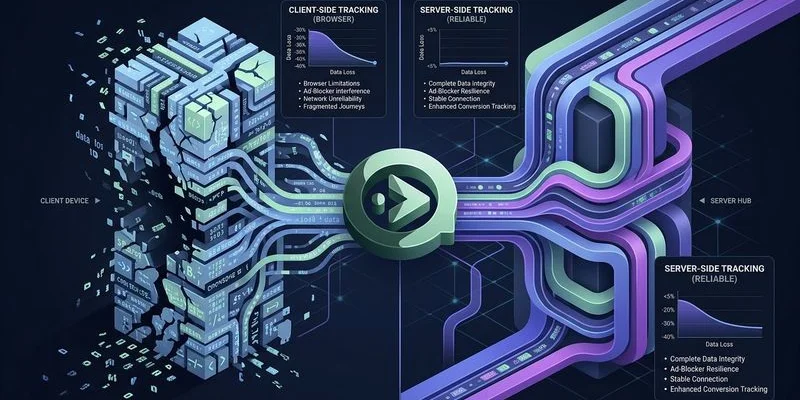
If you manage paid campaigns and still rely on standard browser pixels to track success, you are making expensive decisions based on partial truths. From what we see in client audits this year, relying solely on client-side tracking now misses between 20% and 40% of actual conversion events.
That is not just a margin of error.
That is a structural failure in your ability to measure return on ad spend (ROAS).
We have seen this gap widen significantly with the 2026 privacy landscape, specifically the shift in Chrome’s privacy sandbox and cookie policies. This guide explains exactly why your current setup is failing. We will also cover how server-side tracking (SST) repairs that data pipeline and the specific steps to implement it.
The Problem With Client-Side Pixels
A client-side pixel is simply a piece of JavaScript code that runs in a visitor’s browser. When someone views a product or clicks “Purchase,” that script attempts to tell Facebook, Google, or TikTok about the event.
The issue is that this process relies entirely on the browser. Modern browsers are actively blocking these signals to protect user privacy.
Ad Blockers Are More Aggressive
Popular extensions like uBlock Origin and Ghostery strip tracking scripts before they can even load. About 37% of US internet users now browse with some form of ad blocking active, with rates climbing even higher among tech-savvy demographics. If the script doesn’t load, the conversion never happened in your analytics.
Chrome’s Privacy Sandbox Paradox
Google Chrome abandoned the total removal of third-party cookies in late 2024, but the replacement is arguably harder for advertisers. The new “User Choice” model and IP Protection features prompt users to obscure their digital footprint. Once a user enables these protections, your pixel is blind.
Safari’s 24-Hour Rule
Apple’s Intelligent Tracking Prevention (ITP) in Safari has fundamentally changed the rules. While standard JavaScript cookies used to last for months, ITP is now incredibly strict for ad traffic.
If a user clicks an ad with a tracking ID (like fbclid or gclid) and lands on your site, Safari caps that cookie’s life at just 24 hours. If they click your ad on Monday but buy on Wednesday, you lose the attribution entirely.
Link Tracking Protection
Recent iOS updates introduced Link Tracking Protection in Mail, Messages, and Safari Private Browsing. This feature automatically strips specific tracking parameters from URLs. Without these IDs, the ad platforms cannot connect the purchase back to the ad click. This happens even if the pixel fires perfectly.
How Server-Side Tracking Works
Server-side tracking moves the responsibility of reporting from the user’s device to your own server. Instead of asking the browser to send data to Facebook, your website sends the data to your server first. Your server then relays it to the ad network.
A robust server-side tracking implementation follows a standard workflow:
- Capture: A user clicks an ad and lands on your site. We immediately capture the Click ID (e.g.,
gclid) and store it in a first-party, HttpOnly cookie. - Action: The user completes a purchase or fills out a form.
- Process: Your server processes this event and packages the data. This is where we hash sensitive information like emails (using SHA-256) to ensure privacy compliance.
- Send: Your server sends a direct API request to the ad platform (e.g., Meta Conversions API or Google Enhanced Conversions).
Because this happens between servers, ad blockers cannot see or stop it. The connection is direct, secure, and reliable.
What Server-Side Tracking Fixes
It Bypasses Ad Blockers
Since the request comes from your domain (e.g., metrics.yourbrand.com) rather than a third-party tracker, ad blockers generally permit the traffic. This instantly recovers the data often lost to blocking extensions.
It Extends Cookie Persistence
Browsers treat cookies differently depending on how they are created. While Safari limits JavaScript cookies to 24 hours or 7 days, HttpOnly cookies set by your server are often allowed to persist for up to two years. This restores your ability to track users who take longer to convert.
It Improves Data Match Rates
Meta reports that advertisers using the Conversions API (CAPI) see a 13% reduction in Cost Per Action (CPA) on average. This improvement comes from sending higher-quality user parameters—like hashed email addresses and phone numbers—that client-side pixels often fail to capture securely.
We aim for an Event Match Quality (EMQ) score of 6.0 or higher for our clients. Anything lower usually indicates that the server isn’t sending enough customer data to properly match the user to their Facebook profile.
It Speeds Up Your Site
Moving heavy tracking logic to the server reduces the amount of JavaScript the user’s browser has to download and execute. We often see measurable improvements in Core Web Vitals, specifically Interaction to Next Paint (INP), after migrating heavy tag logic off the client side.

| Feature | Client-Side Tracking | Server-Side Tracking |
|---|---|---|
| Ad Blocker Impact | High (Data blocked) | Low (Bypasses blockers) |
| Cookie Lifespan | 24 hours - 7 days (Safari) | Up to 2 years (Server-set) |
| Data Control | Low (Browser sends everything) | High (You choose what to send) |
| Setup Complexity | Low (Copy-paste code) | Moderate/High (Requires infrastructure) |
| Accuracy | ~60-80% | ~95-99% |
Implementation Approaches
You have three main options for building this infrastructure. The right choice depends on your technical resources and budget.
1. Server-Side Google Tag Manager (sGTM) on Cloud Run
This is the industry standard for most businesses. You spin up a Docker container on Google Cloud Platform (GCP) via Cloud Run that acts as your tracking server.
- Pros: Full control, integrates natively with Google Analytics 4 (GA4), and allows you to strip PII before it leaves your control.
- Cons: Monthly server costs can add up. You typically need a minimum of 2 instances for redundancy, which costs around $90/month on GCP before traffic fees.
2. Direct API Integration
Your developers can write custom code to send events directly from your backend (like Shopify or Magento) to the ad platforms.
- Pros: No recurring server fees for tag management; extremely reliable.
- Cons: High maintenance. If Facebook updates their API (which they do frequently), your developers must rewrite the code.
3. Managed Hosting Wrappers
Tools like Stape.io or Addingwell offer a “wrapper” around sGTM. They handle the server hosting and scaling for you.
- Pros: Much easier to set up than raw GCP and often cheaper. Stape plans start around $20/month for 500,000 requests, making it nearly 3x cheaper than a standard GCP setup for smaller stores.
- Cons: You are adding another third-party vendor to your data chain.
What You Need to Get Started
Before you switch, you must gather specific credentials and configure your environment. Here is the checklist we use for client onboardings:
1. A Custom Subdomain
You need a dedicated subdomain for your tracking server, such as metrics.yourdomain.com. This is critical for setting first-party cookies that browsers trust.
2. API Credentials
You cannot just use your Pixel ID anymore. You need specific authentication keys for server-to-server communication:
- Meta/Facebook: Generate a System User Access Token in Business Manager.
- Google: You need an API Secret depending on whether you are using GA4 or direct Google Ads tracking.
- TikTok: Generate an Access Token from the Events API section of your developer dashboard.
3. Deduplication Logic
This is the most common failure point we see. If you run both client-side pixels and server-side tracking (which is recommended for maximum accuracy), you must send a unique Event ID with both events. If you fail to do this, the ad platforms will count every sale twice. This ruins your reporting.
The Bottom Line
Client-side pixels were built for an open web that no longer exists. Between iOS privacy updates, widespread ad blocking, and Chrome’s user-choice initiatives, the browser is an unreliable messenger.
Server-side tracking is no longer an “advanced” tactic for enterprise brands. It is the baseline requirement for accurate measurement in 2026. A dedicated marketing attribution software platform can tie this server-side data directly to revenue outcomes across every channel. If you are spending money on ads but measuring results with a tool that misses 30% of your conversions, you are bidding in the dark.
Our advice is to start with your single most important conversion event—usually the “Purchase” or “Lead” event.
Migrate that to server-side tracking first. You will likely see an immediate lift in attributed results.